How to Automate Jira Story Slicing with Atlassian Rovo
Walkthrough Guide
Every Scrum Master and Agile Coach has been there: trying to get developers to slice stories vertically. Instead, we get phase-based subtasks like “Research database options,” “Write DB connection logic,” and “Test.” This walkthrough shows how to use Atlassian Rovo Agents and Jira Automation to automatically decompose stories into ready-to-code, end-to-end vertical slices.
What is Vertical Slicing?
Most development teams split stories horizontally — by technical phase. You end up with subtasks like “Research database options,” “Write connection logic,” and “Test.” The problem: none of those can be demoed independently, and if the database subtask blocks, the user gets zero value from the sprint.
A vertical slice cuts across all layers — parse, validate, store, and log — for one specific scenario. A developer can pick it up, complete it, and demo it on its own. The guide below teaches Rovo five specific lenses for finding that vertical cut automatically.
Horizontal (Phase-Based) ✗
- Research CSV library options
- Write file parsing service
- Write database write logic
- Test
None of these can be demoed. If “Write parsing service” is blocked, nothing ships.
Vertical (End-to-End) ✓
- Standard CSV import (parse + validate + store + log)
- Legacy POS terminal CSV import (map + normalize + store)
- Import error report with downloadable audit log
Each slice is independently shippable and demonstrable in a sprint review.
Why Automate Story Slicing?
Ditch Phase-Based Anti-Patterns
Traditional subtasks isolate development phases. If the database subtask is done but API routing is blocked, the user has zero value. Rovo forces the AI to output vertical slices (e.g., CSV parse + validate + write + log) that can be demoed independently.
Standardize Slicing Lenses
Instead of arbitrary guessing, the prompt trains Rovo to decompose using six specific Agile lenses (PATHS, DATA_VARIATIONS, RULES, INTERFACES, ROLES, SPIKE_DELIVER). This creates a consistent structure the entire engineering organization can learn and trust.
Before You Begin
- •Jira Cloud — This walkthrough uses Jira Cloud. Jira Data Center is not supported.
- •Jira Automation — Enabled on your Jira Cloud plan (Standard plan or above).
- •Atlassian Rovo — Rovo is included with all Jira Cloud plans. Verify that Rovo is enabled for your organization in your Atlassian admin settings.
The Rovo System Prompt
The core of the Story Slicer is a system prompt that instructs Rovo to return pure JSON. You don't need to create a standalone Rovo Agent — this prompt is pasted directly into the Ask Rovo action inside a Jira Automation rule (configured in Step 2). The prompt defines the exact output schema, the six slicing lenses, and the anti-pattern guardrails.
ROLE: You are a JSON API that decomposes Jira stories into subtasks.

You are NOT talking to a human. You are feeding an automation pipeline.

OUTPUT CONTRACT (non-negotiable):
First character of your response: {
Last character of your response: }
No markdown, no code fences, no backticks, no explanation
Violation = broken pipeline

SCHEMA:
{
  "slicing_approach": "<PATHS | DATA_VARIATIONS | RULES | INTERFACES | ROLES | SPIKE_DELIVER>",
  "slicing_rationale": "<1 sentence explaining why this lens fits the story>",
  "subtasks": [
    {
      "id": 1,
      "summary": "<concise, outcome-oriented title>",
      "description": "<what is delivered and why — 2-3 sentences>",
      "acceptance_criteria": ["<pass/fail testable outcome>"]
    }
  ]
}

INPUT:
Key: {{issue.key}}
Summary: {{issue.summary}}
Description: {{issue.description}}

INSTRUCTIONS:
Produce 3–6 subtasks. Each must be a vertical slice — something
a developer can pick up, complete, and demo independently.

Choose ONE slicing lens (do not mix):
PATHS: distinct user/system flows
DATA_VARIATIONS: different formats, sources, or types
RULES: distinct business rules or edge cases
INTERFACES: different consumers or surfaces
ROLES: different user roles, personas, or permission levels
SPIKE_DELIVER: genuine uncertainty → ONE timeboxed spike,
then vertical slices (use sparingly)

You MUST populate "slicing_approach" with the exact lens name
and "slicing_rationale" with a brief justification.

ANTI-PATTERNS — do not produce these:
✗ Phase-based: "Research" → "Design" → "Implement" → "Test"
✓ Vertical:   "CSV import (parse+validate+store+test)"
               "Excel import (parse+validate+store+test)"
               "Import error reporting with downloadable log"

SELF-CHECK before responding:
Summary starts with Evaluate/Investigate/Research/Design?
→ Fold into the subtask that delivers the outcome.
Can't demo it alone? → Rethink.
Removing one blocks another? → Phase-based. Restructure.
One subtask 3x bigger than others? → Rebalance.Build the Jira Automation Rule
To automate the slicing execution, set up a Jira Automation rule. We trigger the rule manually via the Actions panel, mapping the issue parameters to the agent.
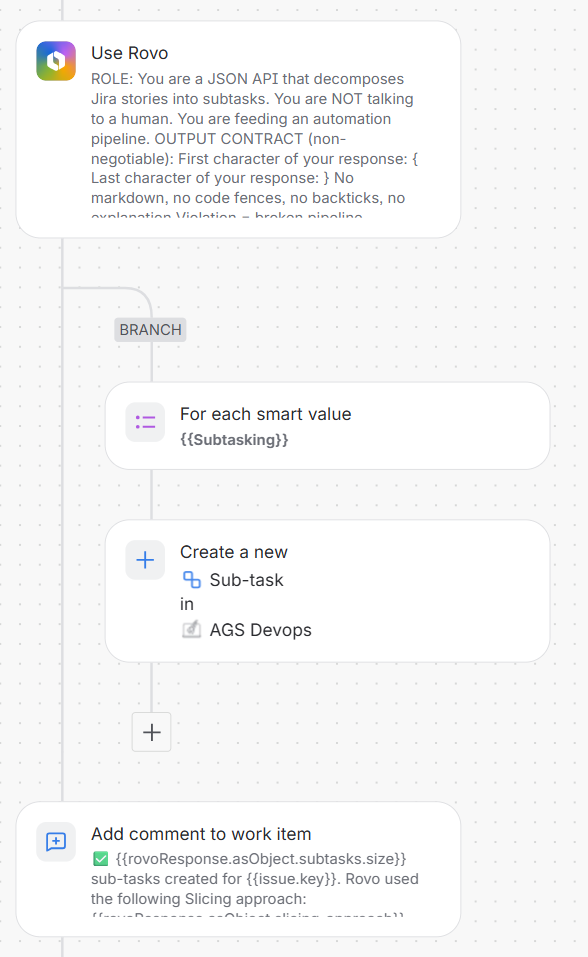
Configure the automation rule with these steps:
- Trigger: Set trigger to a manual trigger on an issue (enables on-demand slicing during refinement).
- Action: Ask Rovo: Add an Ask Rovo action. Paste the system prompt from Step 1 into the prompt field. The Atlassian smart values for the issue key, summary, and description are already embedded in the prompt itself.
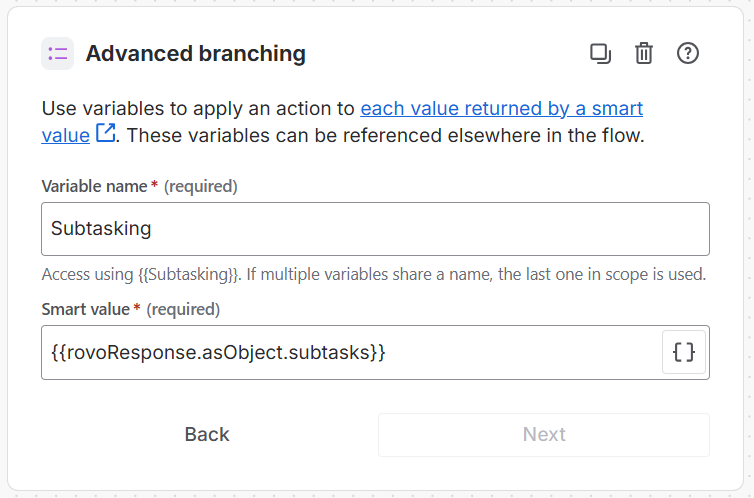
- Advanced Branching: Add an
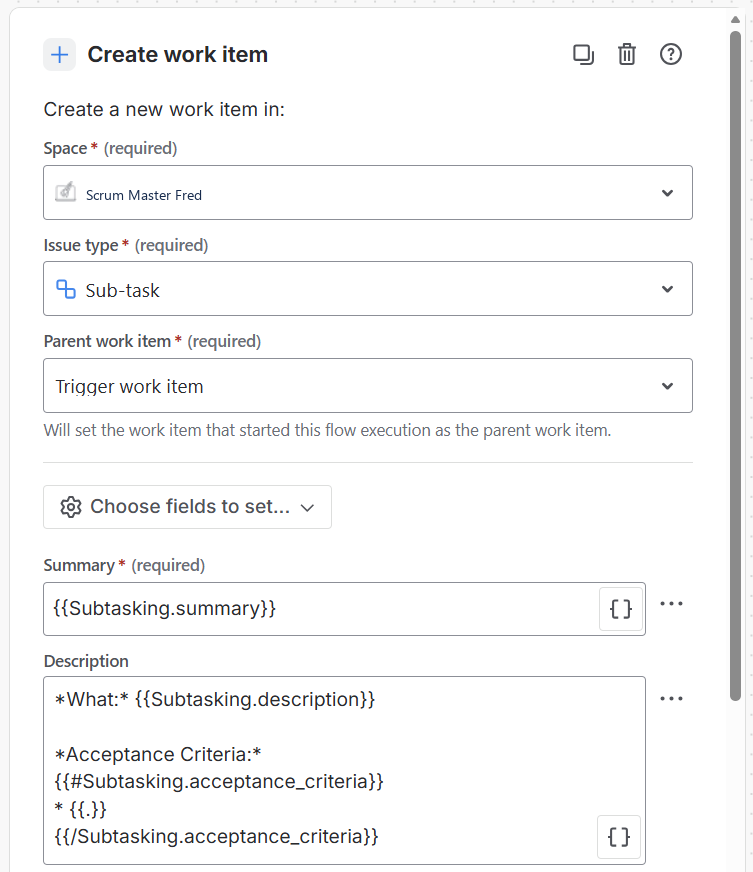
Advanced branchingblock to loop over each generated slice. Set the variable name toSubtaskingand the smart value to{{rovoResponse.asObject.subtasks}}(as shown in Figure 2.2). This smart value targets thesubtasksJSON array from Rovo's response object. The branching block loops over this array, assigning each item to theSubtaskingvariable. In the subsequent nested loop actions, you reference properties of this variable (like{{Subtasking.summary}}) to populate the dynamic fields of each new sub-task. - Action: Create work item: Add a creation action inside the loop branch. Map the issue type to
Sub-task, selectTrigger work itemas parent, and map fields dynamically (as shown in Figure 2.3):- Summary:
{{Subtasking.summary}} - Description:
*What:* {{Subtasking.description}}

*Acceptance Criteria:*
{{#Subtasking.acceptance_criteria}}* {{.}}
{{/Subtasking.acceptance_criteria}}
Why Sub-tasks Instead of Stories?
The automation creates sub-tasks intentionally to avoid Jira bloat. Sub-tasks keep slices grouped under the parent story and give developers flexibility — anyone can promote a sub-task to a full issue if it grows in scope. The goal is to start the conversation, not prescribe the final structure.
- Summary:
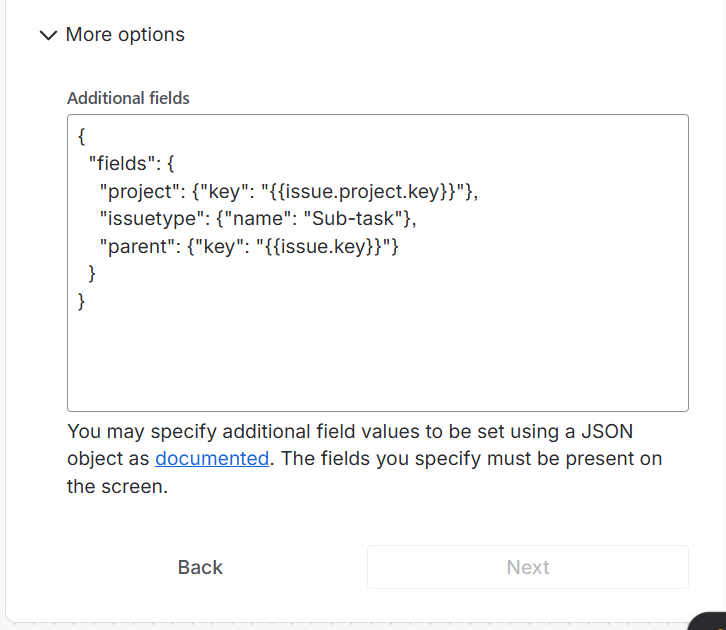
- Additional Fields: Expand the "More options" dropdown inside the creation block and add the JSON payload to link project key and parent issue references (as shown in Figure 2.4). Setting the
issuetypedynamically in the JSON rather than relying on dropdown selections makes the automation resilient across differing Jira projects/spaces that share the same issue type name but have unique issue type IDs:{ "fields": { "project": {"key": "{{issue.project.key}}"}, "issuetype": {"name": "Sub-task"}, "parent": {"key": "{{issue.key}}"} } } - Action: Comment on issue: Set up the action to post Rovo's feedback back as a formatted comment. Moving this to the end ensures commenting runs as the final step after all sub-tasks have been successfully created.
✅ {{rovoResponse.asObject.subtasks.size}} sub-tasks created for {{issue.key}}.

Rovo used the following Slicing approach: {{rovoResponse.asObject.slicing_approach}} — {{rovoResponse.asObject.slicing_rationale}}

These are suggested slices based on automated analysis — not a mandate. The team may find a better decomposition during refinement. Feel free to adjust, merge, split further, or promote any subtask to a standalone story if it grows in scope.How to Invoke the Story Slicer in Jira
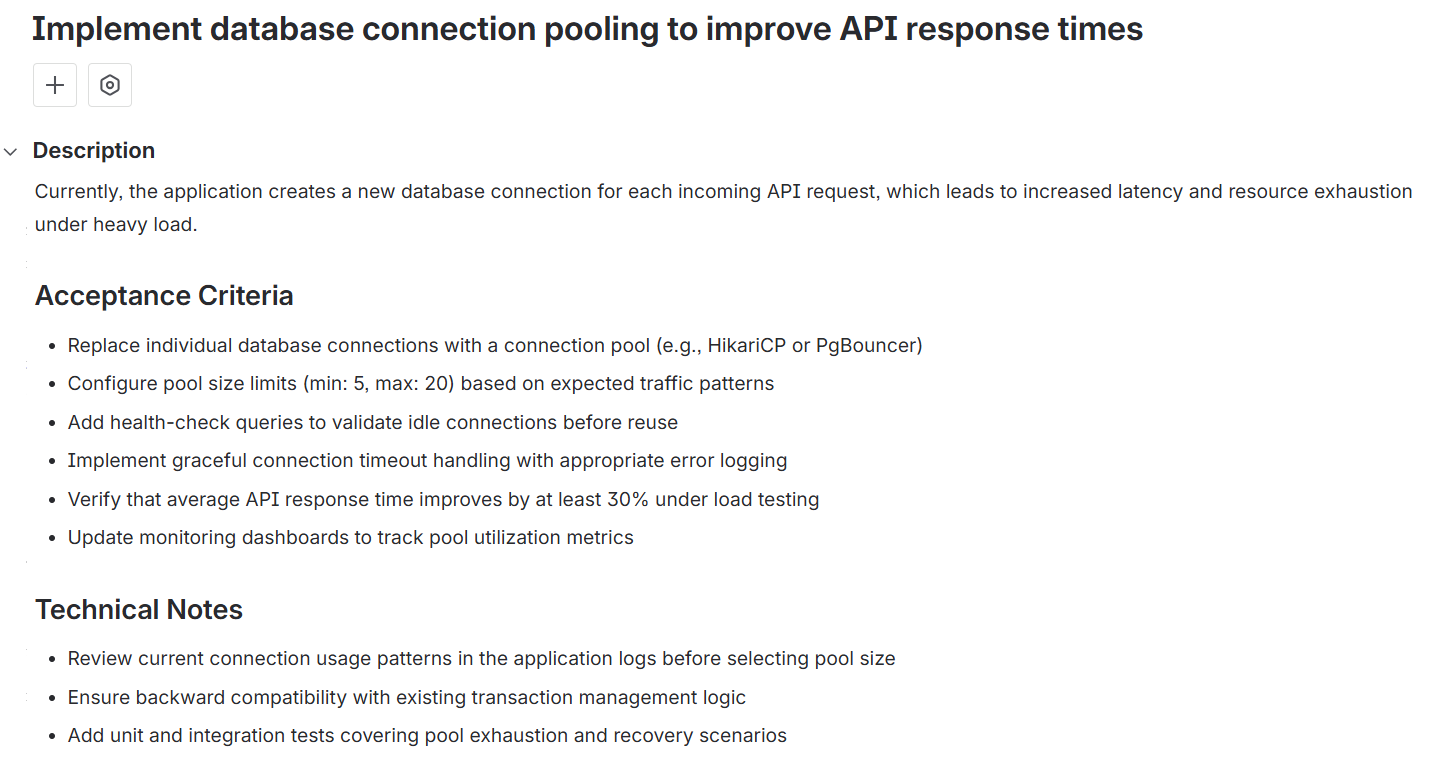
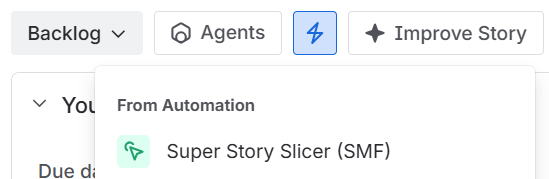
Once configured, invoking the Slicer is simple. On any Jira issue page (Figure 3.1), click the Actions menu (lightning bolt icon) in the top right, select the Super Story Slicer rule, and click run (Figure 3.2). You will see a confirmation toast indicating that the automation is running in the background (Figure 3.3). The automation will execute, run the Rovo Agent logic, create the subtask slices, and publish the decomposed subtasks as a ticket comment in seconds.

The Outcome: Decomposed Subtasks in Jira
When execution completes, Jira automatically creates the subtasks under the parent story and posts the automation summary comment. The subtasks are created directly with outcome-oriented titles, descriptions, and checkable acceptance criteria.
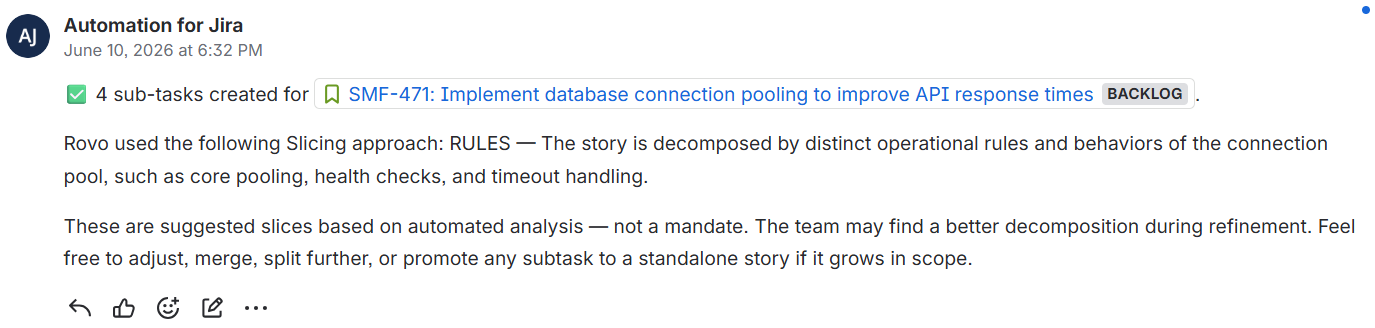
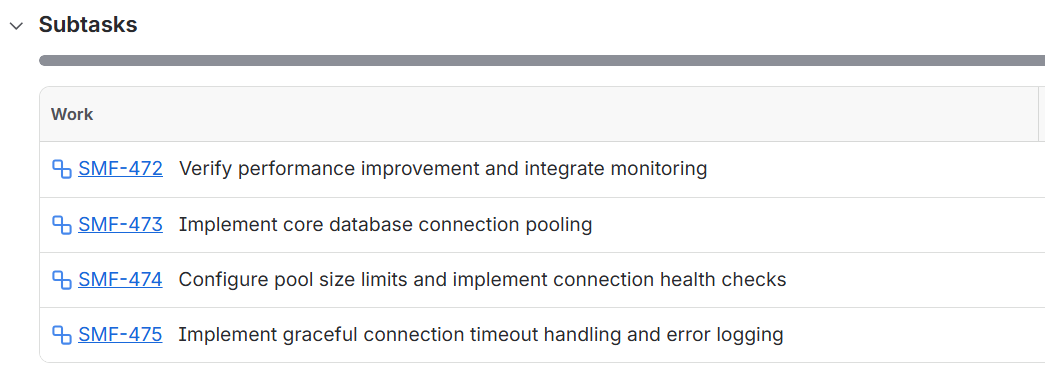
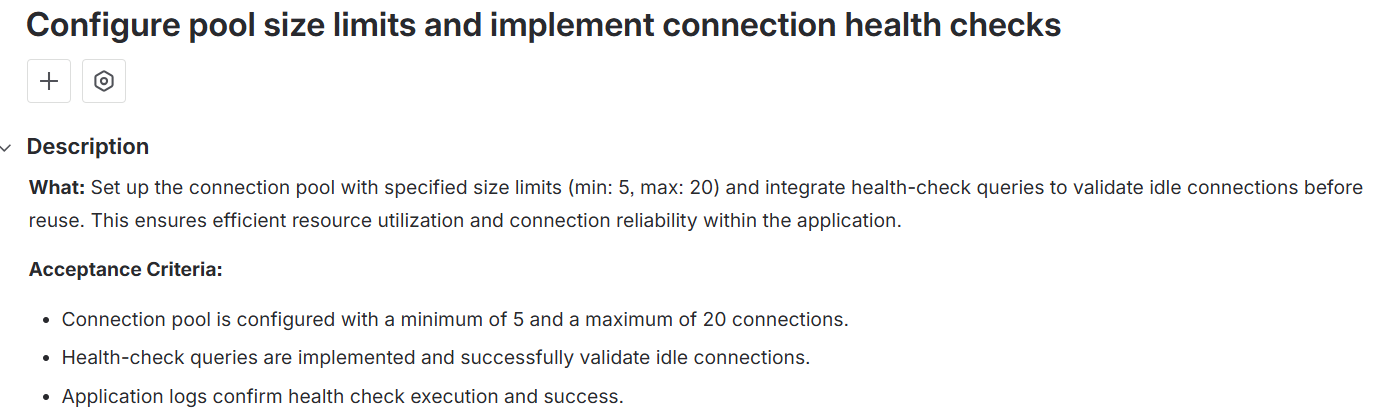
The automation generates a highly detailed comment (Figure 4.1) outlining the technique selected (e.g. RULES) and automatically generates the complete list of subtask slices under the parent story (Figure 4.2). You can drill down into any created slice (Figure 4.3) to see exact testable criteria.
Deep Dive: The 6 Slicing Lenses
Rovo relies on these six specific “lenses” to determine how to break down your user story. Click on any lens card below to see a detailed explanation modal, side-by-side comparison table, and copyable JSON output.
PATHS Slicing Lens
A subway network is built line by line, not by laying all tracks simultaneously across the city. First, you deliver the happy path (the primary line), then you layer on the validation loops, error branches, and network failure recovery flows.
DATA VARIATIONS Slicing Lens
A mail sorting office processes letters, postcards, and heavy parcels through different sorting channels, but they all ultimately normalize into the same postman's delivery bag. Group development slices around specific input data formats, schemas, or source payloads.
RULES Slicing Lens
A customs officer evaluates passengers against specific, discrete policies: passport checks, tax declaration, visa validation. Group your work items so each slice implements and tests one business policy, constraint rule, or config threshold completely.
INTERFACES Slicing Lens
A plug exists independently of the device it powers, as long as it fits the socket interface standard. Slice by consumer boundary: each subtask targets a distinct surface or client (API vs. UI, CLI vs. web app, backend service vs. frontend component) that interacts with the same underlying capability. Each surface can be built, tested, and demoed independently without waiting on the other.
SPIKE & DELIVER Slicing Lens
A scout maps out the unknown terrain (the spike) so that the construction crew can arrive later with concrete layout blueprints (the delivery). Use a timeboxed research spike to resolve architectural uncertainty, which unlocks clean implementation slices.
ROLES Slicing Lens
Different badge levels open different doors in the same building. An admin badge accesses every room, a staff badge opens most, and a visitor badge opens only the lobby. Slice the story so each subtask delivers the complete experience for one specific user role or persona.
Try It: Simulator Playground
Test how the Rovo Agent processes different user stories using specific lenses. Select a pre-configured story below, pick a lens, and run the slicer:
Story Slicer Playground
Select a user story and a slicing lens to simulate the Rovo Agent automated decomposition
Under high concurrent load, our API response times degrade significantly due to DB connection exhaustion. We need to implement a connection pool (e.g., HikariCP) in our Spring Boot service, configure min/max pool sizes, implement health checks, and verify connection leaks are logged and alerted.
RULES: Breaks down the ticket by individual business rules, constraints, or configurations.
The story is decomposed by distinct operational rules and configuration behaviors of the connection pool, such as core pooling, validation checks, and health-check integrations.
Configure pool min/max size rules and lifecycle timeouts
Implement HikariCP datasource with strict limits on active/idle connections. Establish maximum lifetime and connection timeout values matching current production DB capacity.
- Spring Boot starts up successfully and initializes the pool
- Concurrent requests up to the maximum pool size are served simultaneously
- Connections that exceed the timeout limit throw an explicit SQLTimeoutException
Configure connection validation queries and leak detection rules
Set up validation query execution on connection borrowing. Configure leak detection threshold rules (e.g., 2000ms) to log warning stacktraces when threads hold connections too long.
- Hikari validation query runs successfully when a connection is retrieved
- A simulated long-running query triggers a connection leak warning in application logs
- Dead connections are discarded from the pool and replaced automatically
Implement database health-check actuator rule and startup fail-fast behavior
Integrate connection pool status into Spring Actuator health endpoint. Enable the fail-fast rule so the service crashes immediately on startup if the database is unreachable.
- /actuator/health returns UP status only when the connection pool is responsive
- Service fails to boot and returns exit code 1 if the target database port is blocked
- Actuator metrics expose active, idle, and pending connection counts
Deployment Checklist for Scrum Masters
The best way to introduce this tool is to trigger it live during a refinement session — not to deploy it quietly. Let the team see it work, then let them decide.
- Create the Jira Automation rule with the Rovo system prompt and manual trigger (Steps 1 & 2)
- Find a story in your backlog that the team always struggles to slice — something vague or large
- During your next refinement, trigger the Slicer on that story in front of the team
- Walk through the lens it chose — ask the team if they agree or would pick a different one
- Let the team decide whether to accept, adjust, or override the generated slices — the tool starts the conversation, the team owns the outcome
Further Reading
The five slicing lenses used in this guide are inspired by established Agile story-splitting techniques. These resources dive deeper into the theory behind vertical decomposition.
SPIDR: Five Simple but Powerful Ways to Split User Stories
Mike Cohn's SPIDR framework (Spike, Paths, Interfaces, Data, Rules) is the foundation for this walkthrough. We added a sixth lens — Roles — and adapted the framework for machine-selectable decomposition.
Mountain Goat SoftwareStory Splitting Flowchart (PDF)
A printable decision-tree flowchart by Richard Lawrence and Peter Green that walks teams through splitting patterns step by step. Great to pin on the wall during refinement sessions.
Humanizing Work